
MUSIC-DRIVEN VISUALS · COMING SOON

OSCILLIHUE

You build the track.
Oscillihue builds the visual world.

Upload your track, choose a visual world, and shape the way it moves. Oscillihue listens to the music, renders your direction in the cloud, and sends back a finished video.

OR TRY THE LIVE DEMO → VIEW RENDER STUDIES →

Email reserves your place. Verified launch missions can preserve up to 10 promotional credits; signup alone awards none.

From track to final.

Upload your track and choose a visual world from the launch library. Oscillihue analyzes the music, lets you shape how the scene responds, and renders a real preview you can review. When the final is ready, you download the finished video.

  1. 01Upload Track
  2. 02Choose a World
  3. 03Shape the Response
  4. 04Review a Preview
  5. 05Download the Video
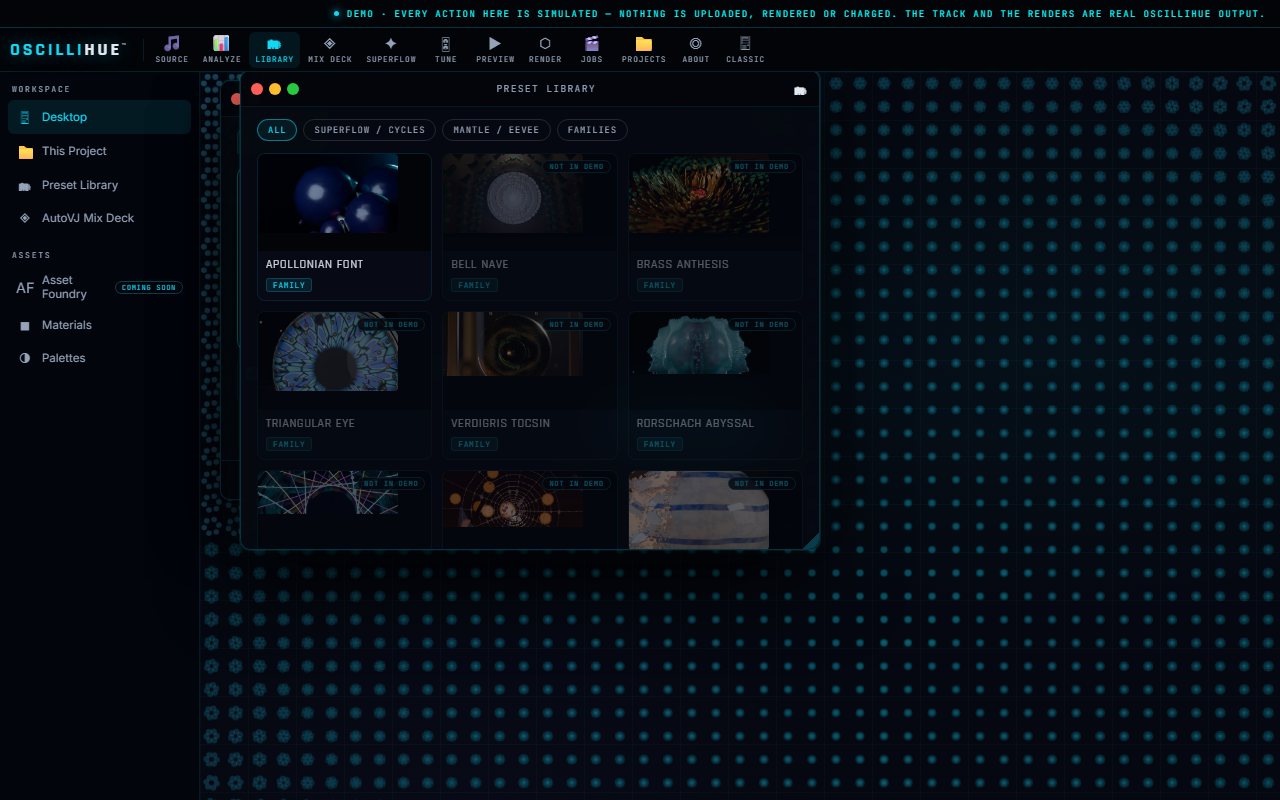
The Oscillihue live demo: the Studio with the demo track analyzed and the Preset Library open
LIVE DEMO / DEMO.OSCILLIHUE.COMSIMULATED PIPELINE / REAL RENDERS

OPEN THE LIVE DEMO →Nothing is uploaded, rendered, or charged. The track and the renders are real Oscillihue output.

Signal becomes
matter.

The same precomputed analysis field in two treatments: immediate browser geometry and dimensional Superflow direction. Drag the split, move the playhead, and tune the frequency bands.

F08 / PRECOMPUTED ENVELOPEPAUSED · MUTED
RAW / WEBGL
MATTER / SUPERFLOW STUDY
00:00.000

Rights-safe staging. The interaction uses non-audio analysis data. The new Fly Away promotional excerpt remains withheld pending written clearance.

Curious about the technical side?

Oscillihue analyzes rhythm, frequency bands, and changes in musical energy. Those signals drive approved controls inside the visual build, including motion, materials, camera behavior, and effects.

AVRNDR runs the build on managed cloud GPUs and produces real preview frames and video. The launch version sends back a finished file. You will not need a local GPU, Blender, Notch, or a plugin.

One world, shaped
by the music.

Solar Iris is a complete procedural scene. Its light, form, camera, and intensity change with the track, so the visual keeps evolving without losing its identity.

The edit listens.

AutoVJ is being built to work from a library of finished clips, follow a track’s energy, and time cuts around beats and downbeats.

This TimeSlice study shows that editing direction in action. It is not a finished one-click AutoVJ workflow yet.

You direct
the result.

Start with a visual world that already works, then shape it around your music. See the real result before you commit to the final render.

  1. 01
    Choose a worldStart with a launch-reviewed visual build, each with its own look and movement.
  2. 02
    Follow the trackBeat timing, frequency ranges, and shifts in energy drive meaningful parts of the scene.
  3. 03
    Shape the responseAdjust color, materials, camera behavior, intensity, and the ending.
  4. 04
    Preview the real renderReview the actual scene before committing to the final version.
  5. 05
    Choose your deliveryDownload a checked 1080p or 4K video at 30 or 60 FPS.
  6. 06
    Pay for completed workCredits are reserved when rendering starts and charged after successful delivery.

Try the controls.
Touch nothing private.

This is a separate, static Studio model. It cannot upload, purchase, render, reach production APIs, or see private projects.

Focused at launch.
More control later.

The first release focuses on one job: turning your track into a finished visual. Later releases can open more of the creative process.

INITIAL RELEASE · LAUNCH HARDENINGV1

PRESET BUILDS

Make a video from your track.

Choose and tune an approved visual world, review cloud-rendered previews, and download a 1080p or 4K video. Everything runs in the cloud. You will not need Blender, Notch, a plugin, or your own GPU.

MANAGED CLOUD RENDERING / NOW IN DEVELOPMENT
NEXT · CREATIVE TOOLSV2

PROMPT TO SCENE

Describe what you want to see.

A future prompt studio could help shape scenes and open more output choices, including vertical, square, and widescreen video.

PLANNED / AFTER THE INITIAL RELEASE
LATER · EXPLORINGV3

CREATOR MARKETPLACE

Build worlds other artists can use.

A future marketplace could let approved digital artists submit Blender scenes for cloud-sandbox review, publish preset packs, and earn from sales or licensing.

PLANNED / REVIEWED BUILDS ONLY

1.5% goes to
carbon removal.

Lightbrush contributes 1.5% of Oscillihue revenue processed through Stripe to carbon-removal projects. You do not pay anything extra.

A COMPANY CONTRIBUTION · NOT A CARBON-NEUTRALITY CLAIM FOR AN INDIVIDUAL RENDER
HOW STRIPE CLIMATE WORKS ↗

A VJ set,
not a screensaver.

Oscillihue grew out of real show work. Watch the full Russ Liquid × Since JulEYE × Lightbrush × TaoBot performance, then explore five render moments from the set.

01 / ACTUAL RENDER Performance Field …134 tokens truncated…le="Kintsugi" data-src="/assets/videos/blog/taobot-vj-set/clean-kintsugi.mp4">02KintsugiPLAY CLIP

CHOOSE A CLIP · PRESS PLAY · SINCE JULEYE × RUSS LIQUID

Visual art.
Always in motion.

We are exploring an always-on stream of finished Oscillihue art for homes, studios, venues, hotels, galleries, and any screen that deserves something alive.

CURATED VISUALS · CONTINUOUS PLAYBACK · PERSONAL AND COMMERCIAL OPTIONS

CHANNELS IS A FUTURE CONCEPT, NOT PART OF THE INITIAL OSCILLIHUE RELEASE.
PLAY THE CURRENT DEMOSUPERFLOW / SOLAR IRIS

Create together.
Shape what’s next.

Your renders stay private unless you choose to publish them. Public work can enter the community feed, earn votes, and take part in the programs we are building around the artists who use Oscillihue.

MONTHLY / TOP 10

The community’s favorite renders move beyond the feed.

Our planned monthly Top 10 would add winning public renders to the Oscillihue VJ Library. Selected work could appear at Lightbrush shows, be made available to participating VJs, and become eligible for 4K compilation packs with creator royalties under published licensing terms.

  1. 01
    Public when you chooseKeep a render private or publish it to the community feed.
  2. 02
    Vote on the next worldsHelp choose future preset concepts and creative directions.
  3. 03
    A path for scene creatorsFuture submissions would be reviewed and cloud-sandboxed before approval.
  4. 04
    Clear creator termsLicensing, royalties, voting rules, and payouts will be published before those programs open.

Credit-pack and subscription pricing will be published closer to launch, with plain examples of what each option can render.

Artist applications
are now open.

3D artists: build audio-reactive worlds in Blender for the Oscillihue marketplace. Share in what your worlds earn, take on paid commissions, and get credited. The program is forming now — apply to help shape it.

APPLY TO THE ROSTER

Earn utility.
Keep the receipt.

LIFETIME CAP0 / 10

Confirm an email to preserve verified rewards.

LIKE THE DESIGNATED X POST+1X USER OAUTH · ONCE
REPOST THE DESIGNATED X POST+2X USER OAUTH · ONCE
ORIGINAL PROOF-CODE POST+2UP TO TWO PLATFORMS
CONFIRMED REFERRAL+3ONE QUALIFIED ACCOUNT
STUDIO WALKTHROUGH+2SIGNED COMPLETION
SAVE A DEMO RECIPE+2IMMUTABLE RECEIPT
WORLD CURATION+1VALIDATED RESULT
APPROVED QA REPORT+3MANUAL REVIEW
USABILITY SESSION+5OPERATOR EVIDENCE

Email signup awards no credits. Promotional credits are non-transferable, have no cash value, apply only to Oscillihue services, and do not expire in v1. Oscillihue never performs social actions for you.

Ready for
your next track.

JOIN THE LAUNCH LIST · OSCILLIHUE BY LIGHTBRUSH

Join before launch.

Save your place and we’ll email you when Oscillihue is ready. Confirming your email preserves future verified mission rewards but awards no credits by itself.

PRE-LAUNCH MISSIONS / 10-CREDIT LIFETIME CAP

Rewards require verified mission evidence. Promotional credits are non-transferable, have no cash value, and are imported into an Oscillihue account once.

Check your inbox.

We sent a confirmation link to . Open it to save your place and activate your personal invitation link.

It may take a few minutes. If you don’t see “Oscillihue Founding Loop,” check spam, promotions, and filtered folders.

You’re on the launch list.

We’ll email you when access opens. Your confirmed email can now preserve verified mission rewards under the 10-credit lifetime pre-launch cap.

VERIFIED PRE-LAUNCH CREDITS0 / 10 LIFETIME

Verified claims will appear here. Email confirmation alone awards no credits.

X LIKE + REPOST

Connect least-privilege X read access. Oscillihue cannot post or act for you.

QUALIFIED REFERRAL

One distinct confirmed account can earn 3 credits. Self-referrals are blocked.

OTHER MISSIONS

Studio, recipe, curation, QA, usability, and original proof-code claims open during invited staging.

10 PROMOTIONAL CREDITS MAXIMUM / VERIFIED PERSON. Rewards are non-transferable utility units with no cash value and do not expire in v1.

That link expired.

Enter your email again and we’ll send a fresh confirmation link.